

SMARTER , FASTER , EASIER .
The Wocky Tocky Customer App
Track live orders, monitor stock availability, receive delivery updates, and stay connected with your business anytime, anywhere through the Wocky Tocky Customer App.
60+
Years of Experience
1500+
Costumer Served
1800+
Product Range
Secure
& Reliable Access
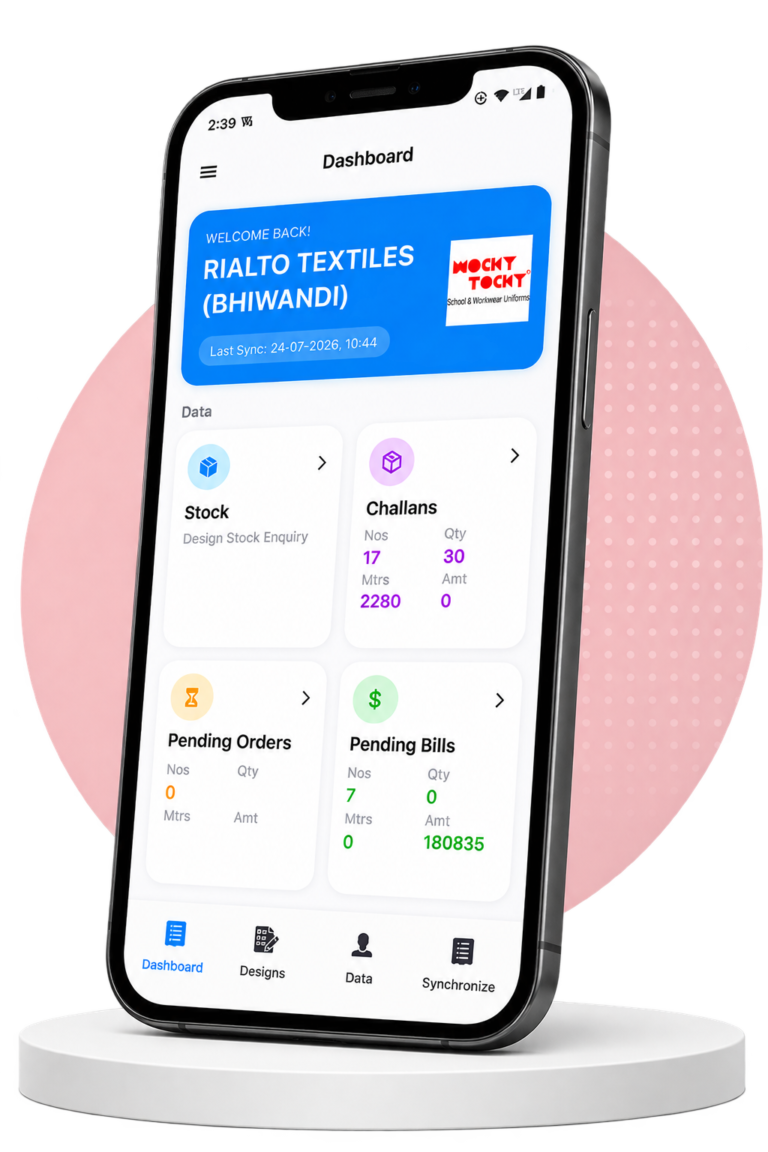
Everything You Need, Right in Your Pocket
Order Tracking
Track every order from placement
to delivery
Challans
View and manage your delivery challans whenever you need them.
Sales Order
Access your sales information
anytime.
Stock Availability
Check available products before placing orders.
Customer Support
Reach our support team directly through app anytime.
Bills & Ledger
View bills and track your ledger details in one place.
A BETTER WAY TO CONNECT
Designed For Every Customer
Whether you are an existing customer or new to Wocky Tocky we have made it simple for you.
01
OUR CUSTOMERS
FOR OUR CUSTOMERS
Wocky Tocky Customer
Download the app to securely manage your orders, account and sales information.
- ✓ Download the App
- ✓ Get Secure Key from Wocky Tocky team
- ✓ Login Securely
- ✓ Track Orders
- ✓ Check Dispatches
- ✓ View Bills
02
NON CUSTOMER
FOR NON CUSTOMERS
Check Stock Availability
Discover our products, check availability.
- ✓ Browse Our Products & Check Availability
- ✓ Stock Enquiry Only
- ✓ Enter Secure Key: 22301111
- ✓ Verify Auto-Filled OTP: OTP-0000
- ✓ Click on Submit to proceed
✓
Secure
Your data is always protected
★
Fast & Easy
Receive alerts and updates
♧
Dedicated Support
Our team is always here to help
◆
Better Experience
Everything you need in one place
-----> HOW IT WORKS <-----
Manage Your Business in 6 Simple Steps
Get started in minutes and access orders, stock availability, dispatch updates, and business insights—all from one app.
1. Download the App
Download the Wocky Tocky Customer App and get started.
4. Check Available Stock
Check the availability of products before placing your order.
2. Receive Secure Key
Enter the Unique Key provided by the Wocky Tocky team.
5. Track Your Orders
Track orders, check delivery status and manage everything easily.
3. Login App Securely
Login securely using OTP on your registered mobile number.
6. Check Account Details
View your account, billing, and transaction details.
1. Download the App
Download the Wocky Tocky Customer App and get started.
2. Receive Secure Key
Enter the Unique Key provided by the Wocky Tocky team.
3. Login App Securely
Login securely using OTP on your registered mobile number.
4. Check Available Stock
Check the availability of products before placing your order.
5. Track Your Orders
Track orders, check delivery status and manage everything easily.
6. Check Account Details
View your account, billing, and transaction details.
Scan to Download Our App


FREQUENTLY ASKED QUESTIONS
Yes. The Wocky Tocky Customer App is completely free for all customers.
Yes. The app is available for both Android and iOS devices.
Yes. Visitors can browse products and search stock.
Yes. A stable internet connection is required for live stock, orders, and dispatch updates.
Install the app and use your unique Secure Key given by team.
Contact the Wocky Tocky office to receive your unique Secure Key.
You can explore your orders, track dispatches, check business activity, and receive important updates.
No, Non-customers can only check stock availability.
Call Us
+91 9323540399
+91 7977704267
Email Us
info@wockytocky.com
Business Hours
Mon - Sat 11:00 AM - 7:00 PM
✦
Follow Us on Instagram
@wockytocky
Follow on Instagram
→